


XBOX
4.5138.78K Reviews
App Specs
- Version
- 2607.1.1
- Updated On
- License
- Free
- Downloads
- 100,000,000+
- Developer
- Microsoft Corporation
- Categories
- Entertainment
- Platform
- Android, iOS
Screenshots
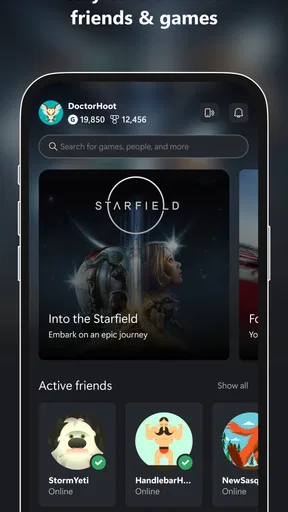
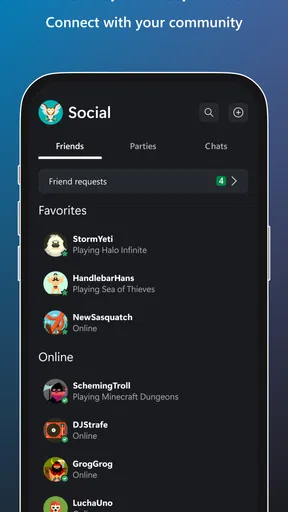
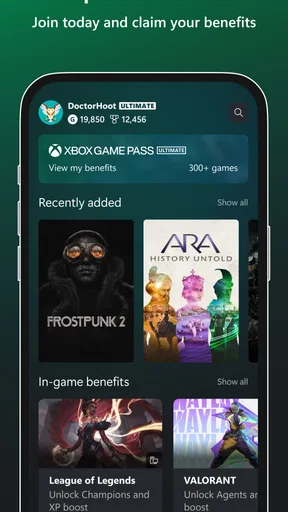
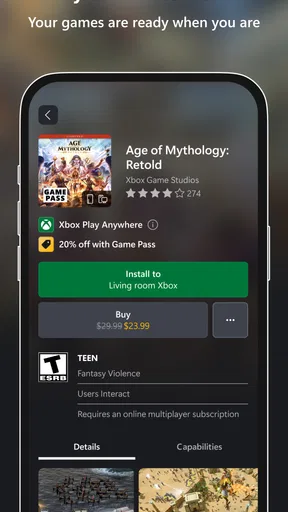
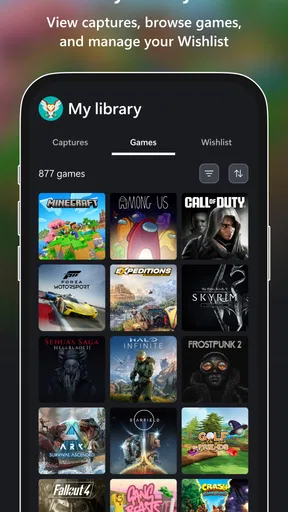
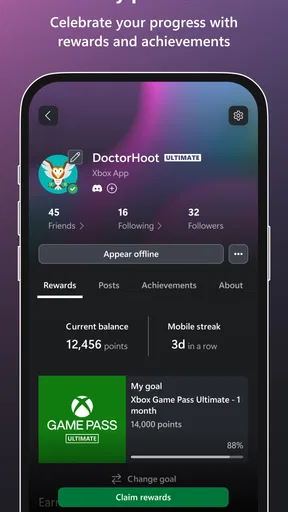
 Analysis by AppCompare
My first week with the XBOX app would be most useful if I already had people to talk to and games to keep track of. It brings console-related conversations and activity onto a phone, so checking in does not have to wait until I’m back in front of the TV. That makes it easier to see the appeal quickly: this is not a replacement for an Xbox console, but a companion for the parts of gaming that happen between play sessions.
Where it earns a place in the first week
I’d start by signing in and finding the friends and game activity I actually care about. The app makes the most immediate sense when my Xbox circle is already active; without that, its social side has less to offer. If I’m new to Xbox, I’d treat the first few days as a chance to get familiar with the community tools rather than expect the phone app alone to create a reason to play.
A practical use is arranging a session while I’m away from the console. I can check in with friends, talk through when we’ll play, and then pick up the controller later. That small handoff is more valuable than it sounds: it keeps a plan from disappearing into a separate messaging thread. For someone who plays with the same group regularly, having that conversation close to Xbox activity can make coordination feel less scattered.
What remains useful month to month
The lasting value depends on how often I use Xbox and whether my friends use it too. If I play every week, a quick mobile check-in can become a natural habit; if I only turn on a console occasionally, the app may sit untouched between sessions. I wouldn’t keep it installed simply because it is connected to gaming. I’d keep it if it saves me a step often enough to matter.
Compared with general-purpose chat apps, its advantage is context: the conversation is tied to an Xbox community rather than being another unrelated group chat. The trade-off is that it is less useful when my friends prefer a different service or when I want one place to organize conversations across several gaming platforms. In that situation, my usual chat app may be the better hub, with Xbox’s app serving as an occasional companion.
For an everyday example, imagine I’m on a lunch break and a friend asks whether I’m free to play later. I can answer from my phone, sort out the plan, and return to work without needing to turn on the console. That is a modest convenience, not a substitute for playing. The app earns its space through these small moments, especially when they happen repeatedly.
Maintenance and small habits
The maintenance burden is fairly ordinary for a community app: I’d keep the app current, stay signed in on a device I trust, and review notifications rather than letting every alert compete for attention. The useful tip is to be selective early. If an alert is not helping me coordinate or notice activity I care about, switching it off can make the app feel calmer without losing its central purpose.
Worth Reading Before You Choose

Flipboard Shows What News Apps Must Do Beyond the Feed

Switching to Android Auto Means Rethinking Your Driving Routine

Google Calendar Makes a Crowded Week Easier to Manage

Ludo King Makes the Most of the Minutes Between Plans

Baby Panda World Brings Quick Play to Modern Phones, but Its Game Library Feels Busy

ESPN’s Live Game View Makes Following Close Games Easier
I’d also avoid treating the phone as the place to do everything. A mobile screen is convenient for short replies and quick checks, but longer conversations and actual play still belong on the devices and services that suit them. That division keeps the app from becoming another screen I feel obliged to monitor. Its best routine is brief: check what matters, respond when useful, then put the phone away.
When the convenience wears thin
Social apps can become tiring when the feed or notifications keep asking for attention without adding much to the day. If I don’t care about a particular update, I don’t need to keep checking it just because it is available. The app is a weaker fit for someone who wants a quiet, offline gaming experience, or who has no Xbox friends to connect with. A console alone may be enough for those players.
There is also a practical distinction between staying connected and being ready to play. A phone can help me keep up with friends, but it does not remove the need for the console and a suitable time to use it. I’d be careful not to confuse convenient communication with portable access to every part of the Xbox experience. If my main goal is gaming on a phone, I’d first check whether the particular play option I want works for my setup rather than assume the companion app will cover it.
The app comes from Microsoft Corporation and is free, which makes trying it straightforward. Its average rating is 4.5 from around 2.3 million ratings, with about 138,000 written reviews and over 100 million installs. It is rated Teen, was released on November 19, 2013, and version 2605.2.4 requires Android 8.0 or later. Those details give a sense of its broad reach and ongoing presence, but they don’t tell me whether its social tools will fit my own habits; that depends on how I use Xbox.
What’s the Deal with the XBOX App?
First things first, this app is your gateway to the Xbox universe, all neatly packed into your smartphone. It connects you to your Xbox console, allowing you to stay in the game even when you're away from your TV. Available on both Android and iOS, the app is designed to keep you linked to your gaming community and the console itself.
With the app, you can chat with friends, share game clips, and even manage your Xbox console remotely. It’s like having a mini Xbox in your pocket! The app is super intuitive, with a sleek design that makes navigating through its features a breeze. Trust me, once you get the hang of it, you’ll wonder how you ever managed without it.
Key Features
Now, let’s get into the nitty-gritty of what this app offers. Here’s a quick rundown:
- Remote Play: Stream your games from your console to your phone. Perfect for those moments when someone else is hogging the TV.
- Social Connectivity: Chat with your Xbox friends, create or join parties, and manage your friends list effortlessly.
- Game Library Management: Browse and manage your game collection, download games remotely, and keep track of updates.
- Personalized Feed: Stay updated with the latest game news, achievements, and clips from your friends.
These features are designed to enhance your gaming experience, making sure you’re always in the loop, no matter where you are.
Why I Love It
Personally, what I love about this app is how seamless it makes everything. The XBOX app ensures that you’re never too far from your gaming world. The Remote Play feature is a lifesaver for those long commutes or when you’re stuck in a waiting room. It’s like carrying your console around without the actual weight!
The social aspect is another highlight. Gaming is as much about community as it is about the games themselves. Being able to chat, share clips, and see what your friends are up to adds an extra layer of fun and connection. It’s like hanging out with your buddies, even if you’re miles apart.
Room for Improvement
Every app has its quirks, and the XBOX app is no different. While it’s generally smooth sailing, there are occasional hiccups with connectivity during Remote Play. It’s not a deal-breaker, but something to be aware of if you’re planning a long gaming session.
Another aspect that could use a little polish is the notification system. Sometimes, it feels like you get bombarded with alerts that aren’t as relevant. A bit more customization on what you receive would be a nice touch.
Final Thoughts
All in all, the XBOX app is a fantastic companion for any Xbox gamer. It bridges the gap between your console and your mobile life, making sure you’re always connected to the action. Whether you’re checking in on friends, managing your games, or sneaking in a quick session, this app has got you covered. It’s definitely worth the download and will quickly become a staple on your phone.
So, if you haven’t already, give the XBOX app a whirl. It’s like having a little slice of gaming heaven, right at your fingertips.
Who will keep it installed?
My long-term verdict is that this is easiest to recommend to people who already play on Xbox and want their friends, messages, and console-related tasks closer at hand. It is less compelling for someone who rarely plays, prefers another community’s chat, or expects a phone app to replace a console session. For me, the right test is simple: after the novelty wears off, do I use it to make a real plan, respond to a friend, or handle a quick task? If yes, it has earned a small but useful place on my phone.
Pros
- User-friendly interface enhances navigation.
- Access to a vast library of games.
- Seamless cross-platform integration.
- Regular updates improve functionality.
- Robust parental controls for safety.
Cons
- Requires high-speed internet for optimal use.
- Some features need a paid subscription.
- Occasional app crashes can occur.
- Limited offline functionality available.
- Large app size may consume significant storage.
FAQs for XBOX
What are the main features of the Xbox app?
The Xbox app offers a range of features for gamers, including remote play from your console, access to Xbox Game Pass, social connectivity with friends, and the ability to purchase and download games directly to your console. It also provides a platform for game clips and screenshots sharing, as well as chat and party features.
Is the Xbox app free to download and use?
Yes, the Xbox app is free to download on both Android and iOS devices. However, some features like Xbox Game Pass require a subscription. Remote play and online multiplayer access might also need an Xbox Live Gold subscription or Xbox Game Pass Ultimate membership for certain functionalities.
Can I use the Xbox app to play games remotely?
Absolutely, the Xbox app allows you to stream games from your Xbox console to your mobile device. This feature, known as remote play, requires a stable internet connection and a compatible Xbox console. It allows you to enjoy your favorite games on the go, providing flexibility and convenience.
What devices are compatible with the Xbox app?
The Xbox app is compatible with a wide range of Android and iOS devices. To ensure optimal performance, make sure your device meets the minimum system requirements specified in the app store. This includes having a modern operating system version and sufficient storage space for installation.
How does the Xbox app enhance social interactions among gamers?
The Xbox app enhances social interactions by allowing users to connect with friends, join parties, and engage in voice or text chats. It also enables sharing of game clips and screenshots, fostering a community feel. The app keeps you updated on your friends’ activities and achievements, making gaming a more connected experience.


